1. pve调整虚拟机的磁盘
直接调整大小即可,我这里是新增了32G
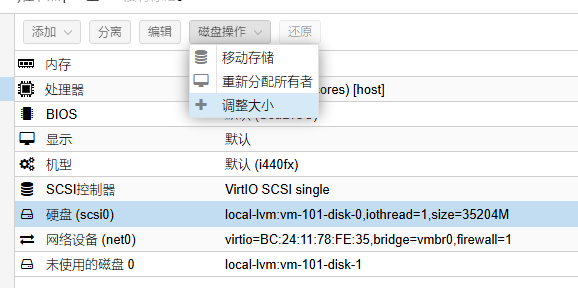
2. 扩容
2.1. 对分区扩容
ssh连接iStore,输入parted,进入分区工具
root@iStoreOS:~# parted
GNU Parted 3.4
Using /dev/sda
Welcome to GNU Parted! Type 'help' to view a list of commands.
输入print,打印分区信息
(parted) print
Model: QEMU QEMU HARDDISK (scsi)
Disk /dev/sda: 36.9GB
Sector size (logical/physical): 512B/512B
Partition Table: msdos
Disk Flags:

Number  Start  End     Size    Type     File system  Flags
 1      262kB  134MB   134MB   primary  ext2         boot
 2      135MB  403MB   268MB   primary
 3      403MB  2551MB  2147MB  primary  ext4
确定扩充 /dev/sda3,执行:
resizepart 3 100%
输出如下,yes确认,quit退出分区工具即可
(parted) resizepart 3 100%
Warning: Partition /dev/sda3 is being used. Are you sure you want to continue?
Yes/No? yes
(parted) quit
Information: You may need to update /etc/fstab.
2.2. 对文件系统扩容
执行
resize2fs -p /dev/sda3
输出:
root@iStoreOS:~# resize2fs -p /dev/sda3
resize2fs 1.46.5 (30-Dec-2021)
Filesystem at /dev/sda3 is mounted on /overlay; on-line resizing required
old_desc_blocks = 1, new_desc_blocks = 5
The filesystem on /dev/sda3 is now 8913728 (4k) blocks long.